![Apify Pricing [2026]: What You Actually Pay](/_astro/apify-pricing.RXLYXD34_Z1scUfv.webp)
New to Apify? Start with what is Apify and how it works before diving into pricing.
Apify’s pricing page lists the plans clearly enough. But once you actually start using the platform, the questions pile up fast. What’s a compute unit? Why does this Actor cost extra? What does the Store discount actually save me? Does the free plan run out in a day?
This guide cuts through all of it. Here’s exactly what Apify costs, how the billing works, and which plan makes sense for you.
Apify pricing at a glance
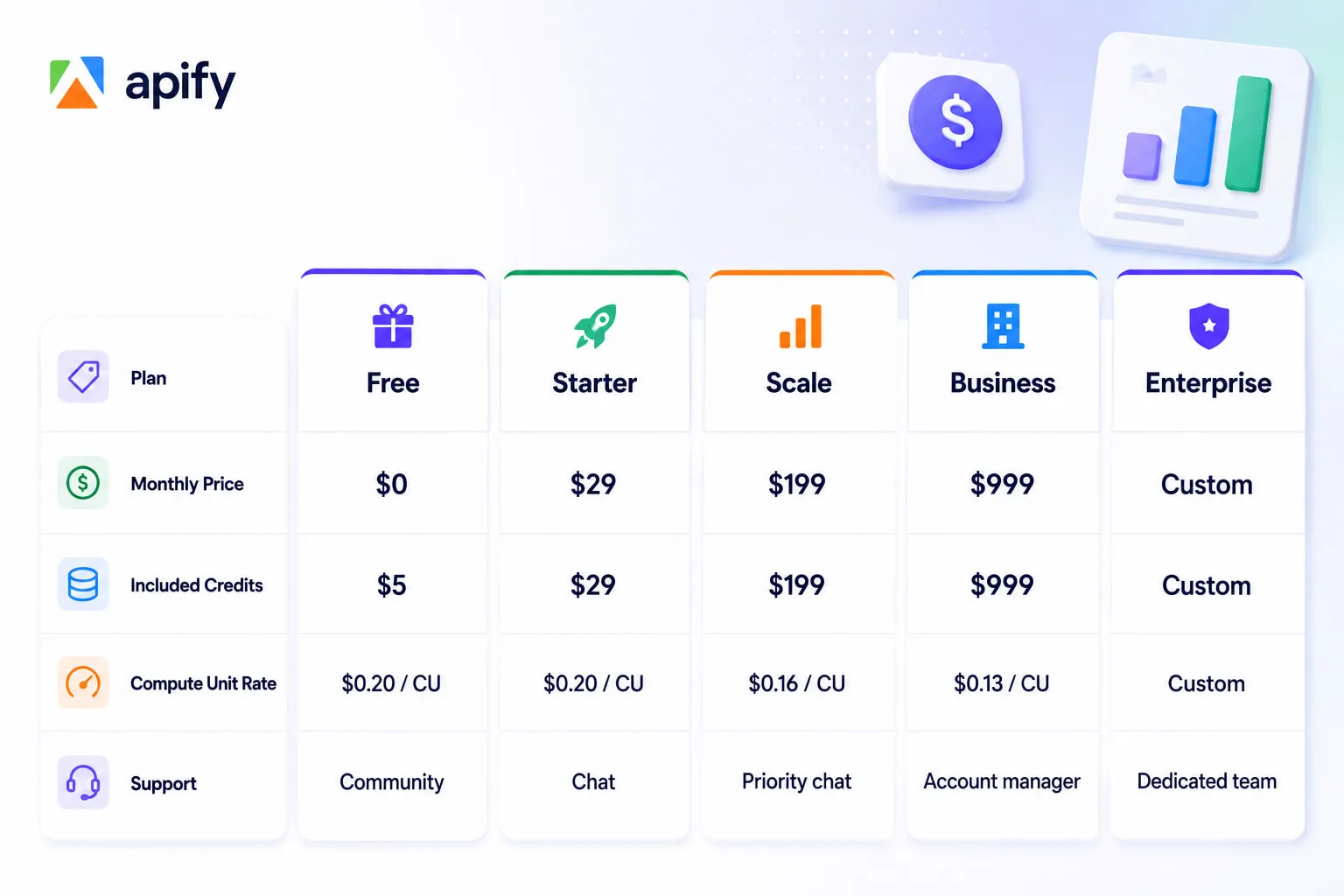
Annual billing saves 10% across all paid plans. The free plan requires no credit card.
What are you actually paying for?
Before diving into the plans, it helps to understand what the credits actually cover. When you run an Actor on Apify, your account is charged for four things:
Compute units (CU): The main cost. A compute unit measures the CPU and memory your Actor uses over time. The formula is memory (GB) multiplied by duration (hours). So an Actor running with 1 GB of memory for one hour consumes exactly 1 CU. Most standard scraping runs fall well under 1 CU.
Data transfer: The amount of data moving between websites, the Apify platform, and your outputs.
| Type | Free | Starter | Scale | Business |
|---|---|---|---|---|
| External (per GB) | $0.20 | $0.20 | $0.19 | $0.18 |
| Internal (per GB) | $0.05 | $0.05 | $0.045 | $0.04 |
A scraping job that pulls 1 GB of page data costs $0.20 on the Free or Starter plan.
Storage operations: Reading and writing data to your dataset, where Actor results are stored.
| Type | Free | Starter | Scale | Business |
|---|---|---|---|---|
| Timed storage (1,000 GB-hours) | $1.00 | $1.00 | $0.90 | $0.80 |
| 1,000 reads | $0.0004 | $0.0004 | $0.00036 | $0.00032 |
| 1,000 writes | $0.005 | $0.005 | $0.0045 | $0.004 |
Example: writing 10,000 scraped results to your dataset costs $0.05 on the Free plan.
Proxy costs: If an Actor uses Apify’s proxies to avoid getting blocked, those are billed on top of compute.
| Type | Free | Starter | Scale | Business |
|---|---|---|---|---|
| Residential (per GB) | $8 | $8 | $7.5 | $7 |
| Datacenter | 5 IPs included | 30 IPs included, then $1/IP | 200 IPs included, then $0.8/IP | 500 IPs included, then $0.6/IP |
| SERP (per 1,000 SERPs) | $2.5 | $2.5 | $2 | $1.7 |
Example: scraping 1 GB of pages through residential proxies costs $8 on the Free or Starter plan — this is why proxy-heavy Actors often cost more per result than simple ones.
The dollar amount for each varies by plan. Credits from your subscription cover all of the above, and you pay for any overage beyond your included credits.
Apify’s free plan: what $5 actually gets you
The free plan gives you $5 in monthly credits — no credit card required. At $0.20 per compute unit, that’s 25 CUs to spend.
In practice, 25 CUs goes a reasonable distance. A standard scraping job with 1 GB of memory running for 10 minutes consumes roughly 0.17 CU. You could run that same job around 150 times within your monthly free credits if you’re only charged for platform usage.
The important caveat: if you’re running Actors that use Pay Per Event pricing (where you’re charged per result), the cost per run depends on how many results you pull, not just compute time. More on that below.
The free plan is genuinely useful for evaluating the platform, running occasional jobs, or testing Actor configurations before committing to a paid plan. The limitations that actually matter are monthly credit volume and community-only support.
Starter ($29/month): for regular individual use
The Starter plan gives you $29 in monthly credits — equivalent to your subscription fee — and bumps support to chat. You also get access to Bronze-tier discounts on participating Actors in the Apify Store.
This plan suits individuals or small teams running scraping jobs regularly but not at scale. If your monthly usage consistently hits the $29 ceiling, you’re getting solid value since the subscription fee and your credits are the same amount.
Scale ($199/month): for teams and high-volume use
Scale gives you $199 in credits, a reduced compute unit rate ($0.16 vs $0.20), priority chat support, and Silver Store discounts.
The lower compute unit rate starts to matter at this level. If you’re running dozens of Actor jobs per week, the 20% reduction in compute costs adds up meaningfully over a month.
Business ($999/month): for production workloads
Business brings the compute unit rate down further to $0.13, adds a dedicated account manager, and unlocks Gold-tier Store discounts. At this level, Apify is typically powering a core business workflow rather than a side project.
What are Apify Store discounts?
Each paid plan includes a discount tier — Bronze, Silver, or Gold — that applies to participating Actors in the Store. When an Actor developer opts into the discount program, users on higher plans pay less per result or per event.
Not every Actor participates. Whether a discount applies to a specific Actor, and how much it reduces the price, is shown on the Actor’s Pricing tab before you run anything.
For heavy users of popular Actors, this discount can be a meaningful secondary reason to choose a higher plan beyond just credit volume.
Actor pricing: pay per usage vs. pay per event
This is where most people get confused, because different Actors bill differently.
Pay per usage Actors charge you only for the platform resources they consume — compute units, data transfer, storage. There’s no additional charge from the developer. The cost depends entirely on how long the Actor runs and how much memory it uses.
Pay per event (PPE) Actors charge per specific outcome, most commonly per result added to your dataset. The developer sets the price per event, and Apify deducts it from your credits as the Actor runs. Most PPE Actors include platform usage in their event price, so you’re not double-charged — but always verify on the Pricing tab since some charge platform usage separately.
The practical difference: with pay per usage, cost scales with run time. With PPE, cost scales with results. If you want 10,000 job listings and the Actor charges $0.005 per result, you’re spending $50 regardless of how long the run takes.
One useful PPE feature: you can set a maximum charge limit before starting a run. The Actor stops gracefully when it hits that ceiling, so you’re never surprised by an unexpectedly large bill.
Note: Apify is retiring the rental pricing model in 2026. Rental Actors (where you pay a flat monthly fee to the developer) are being fully phased out by October 2026 and migrated to pay-per-usage pricing.
Which plan do you actually need?
Here’s a practical framing based on use case:
Free plan works if you’re evaluating Apify, running occasional one-off scrapes, or testing a workflow before committing. The $5 credit resets monthly.
Starter makes sense if you’re running scraping jobs at least weekly, need chat support, or want Store discounts. The $29 subscription and $29 in credits balance out cleanly.
Scale is the right move once you’re running Actors daily, operating across multiple projects, or finding that the Starter credit limit is a recurring constraint.
Business is for production systems where Apify is central to your data pipeline and reliability and account-level support matter.
Apify’s pricing is transparent once you understand compute units and the difference between pay-per-usage and pay-per-event Actors. Start on the free plan to validate your use case, move to Starter when your needs outgrow it, and scale up from there as your usage grows.
Try Apify platform for free and get $5 in monthly credits with no commitment required.
Frequently asked questions
Is Apify free forever? Yes. The free plan has no expiration — your $5 in credits resets every month indefinitely. You can use Apify without ever paying anything, as long as your usage fits within the free tier.
Do unused credits roll over? No. Monthly credits reset at the start of each billing period. Credits that go unused don’t carry forward.
What happens if I go over my included credits? You pay for overage at the compute unit rate for your plan. Apify doesn’t cut you off mid-run — you continue working and the overage appears on your next invoice.
Are proxies included in the plan price? Residential, datacenter, and SERP proxy usage are billed on top of your compute unit credits, at the rates shown above. Some PPE Actors include proxy costs in their per-event price — check the Actor’s Pricing tab to confirm what’s included before running large jobs.
Can I change plans mid-month? Yes. You can upgrade or downgrade at any time from the Billing section in Apify Console.
Does the free plan include access to the full Apify Store? Yes. Free plan users can run any Actor in the Store that offers a free tier or pay-per-usage pricing. Some PPE Actors give free plan users a limited number of results before requiring a paid plan — this is displayed clearly on each Actor’s page.
Is there a trial for paid plans? There’s no traditional free trial for the paid subscription plans. The free plan itself serves as the trial — $5 in monthly credits, no card required, full access to the Store. Most people find that enough to evaluate whether Apify suits their needs before upgrading.